
Supporting Non-Designers With an AI-Powered Website Builders
I led the research and planning of two modular website builders, driving faster publishing and launching Wix’s first AI-powered features.
Stakeholders & Involvement
- Early Strategy - Partnered with PMs, analysts, and devs to define the product vision and strategy.
- Design Integration - Worked hands-on with UX, product, and content designers to bring the strategy to life in each deliverable.
- Iteration & Optimization - Stayed involved through continuous testing and fine-tuning.
Deliverables & Features


Key Impact: Reduced time-to-publish by 47% and improved success across core KPIs by 84%.
Framing the Problem
- Most Wix users are non-designers, and building a website often feels slow and frustrating.
- The process takes too much time, involves trial and error.
- Content creation is overwhelming, and pages don’t adapt well to mobile, resulting in cluttered Websites with poor hierarchy and accessibility issues.
- For Wix, this also means lower conversion rates.
Research
User Voice - What did we hear most?
- Users knew what they wanted to achieve, but struggled to bring it to life.
- Many had trouble finding apps, product pages, or utility pages like 404.
- Building mobile-friendly pages was a recurring challenge.
- “Where are the pre-made pages? They were very helpful to me”
- “When I need to add new page, I can duplicate one and work on it, but it will never look like it should”
- “I wanted to add a Store and had no idea how… I didn't want to start all over, it was very frustrating”
- “It took a long time”
What signals show demand?
- These users rely on Wix’s guidance and expressed the need for templates.
- They actively requested this functionality through support tickets and feature requests.
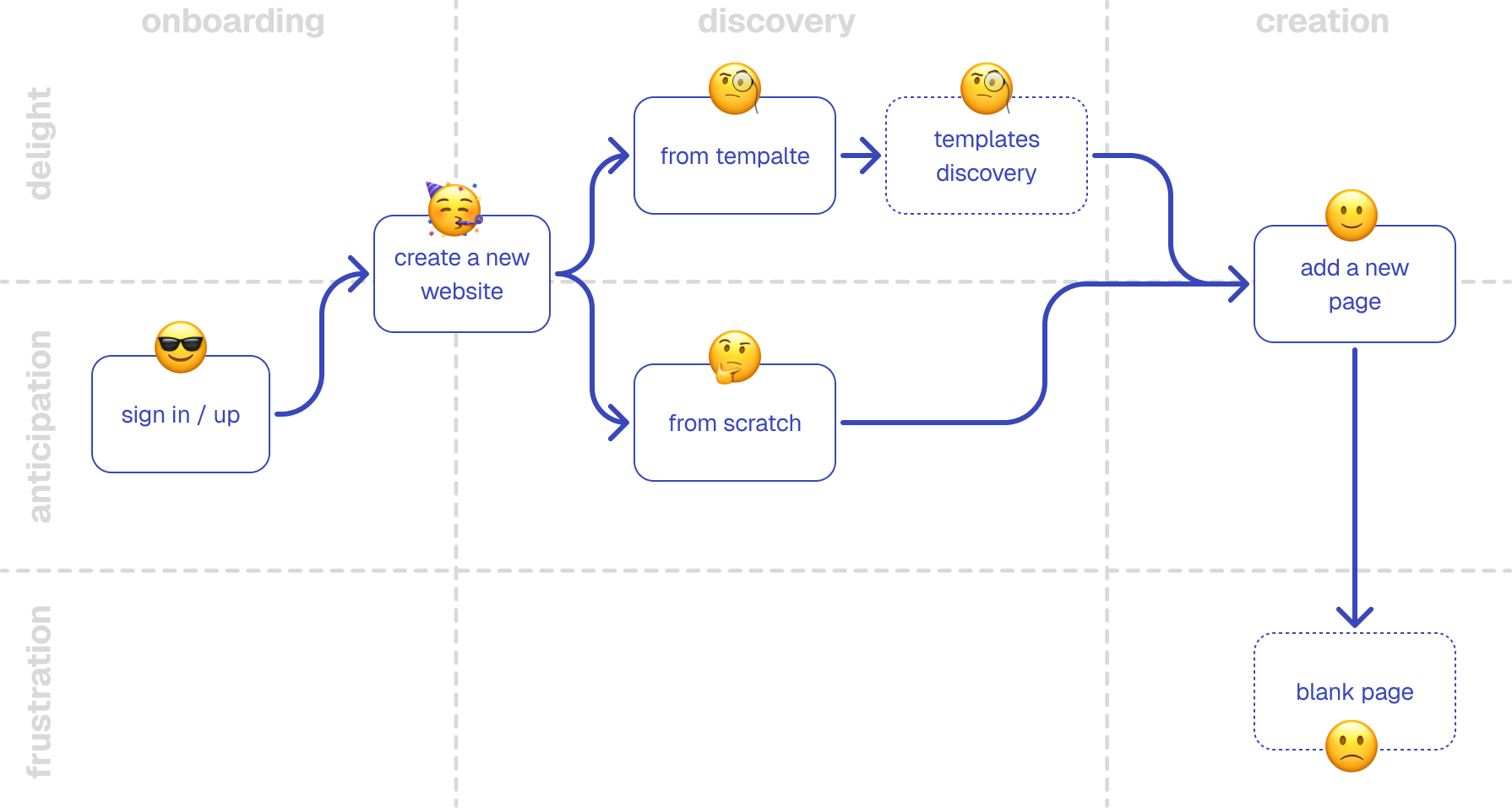
User Journey
FullStory sessions and BI reports pointed to friction between discovering the product and creating content. Many users slowed down or got stuck during editing and publishing.
I mapped the flow and combined it with insights from user interviews to understand why - and define where we could help.
Ideation & Strategy
Drawing from data and user insights, I refined the problems, mapped opportunities, and proposed solutions:
Problem:
Users struggle to find the entry point for adding a new page

Solution:
Offer more then one guided way to add new pages
Problem:
Blank page starts slow users down and make building feel stuck
instead
of
smooth and fun

Solution:
Provide ready-made page layouts and section presets, organized by
content
and use categories.
Problem:
User-built pages often lack hierarchy, accessibility, and visual
consistency

Solution:
Presets come with an accessible structure and clear, customizable
design
settings.
Problem:
User-built pages often break or look poor on mobile.

Solution:
Ensure all presets are fully mobile-optimized out of the box.
Final Design & Launch
#1 - Add Page
Launched as a new “quick and easy” builder, accessed via the main Add Panel, with clear entry points into the module.
Preset Collection


Offering a wide variety of page presets for different needs, including:
Static - edit content directly on the page
Dynamic - manage content through a connected CMS collection
App-Based - powered by Wix apps like Blog, Events, and Bookings
#2 - Add Section
Following the success of the first module, we launched a second builder - Add Section - based on the same product methodology, but designed for adding individual sections within a page.
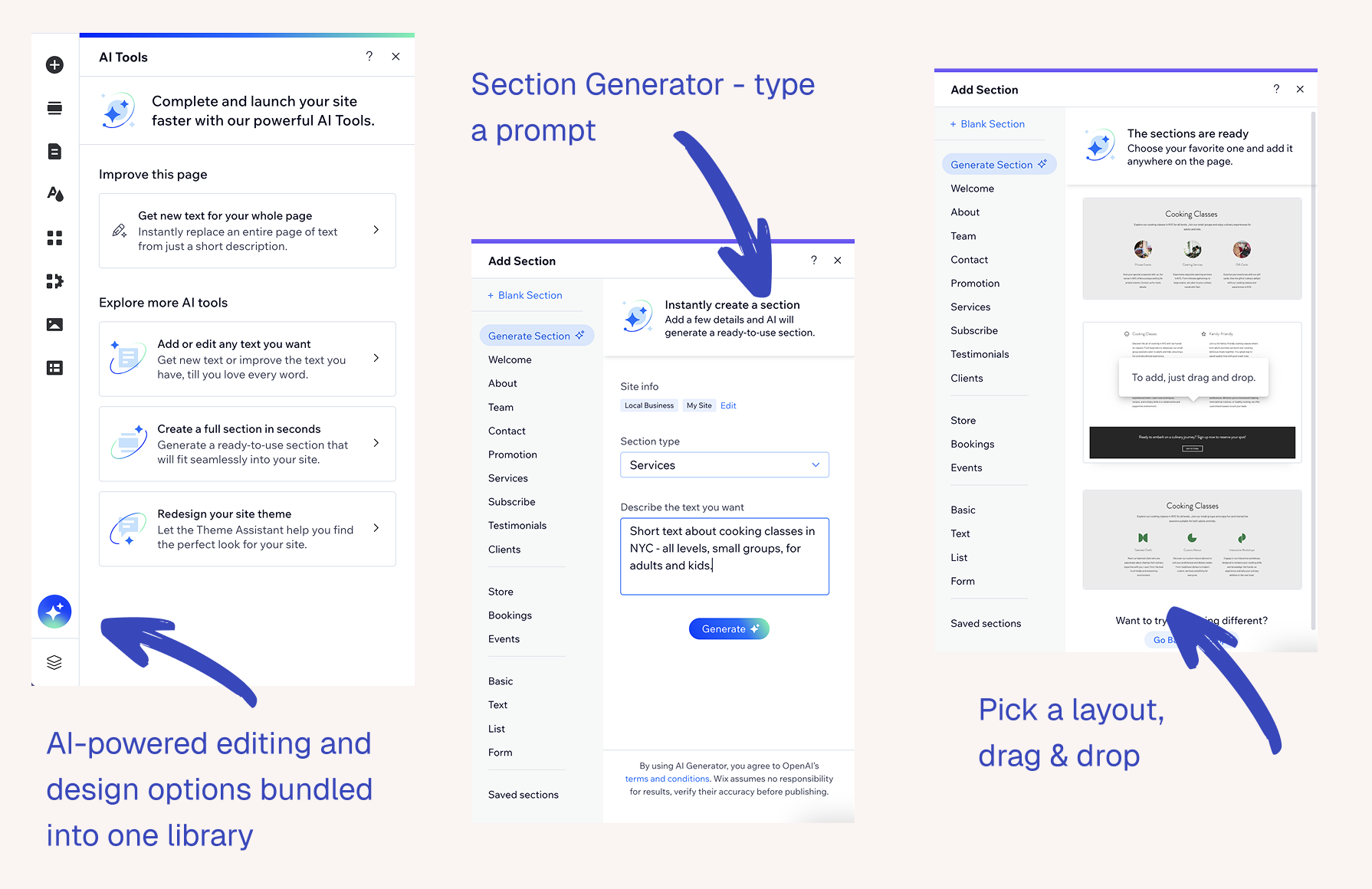
AI Integration
In late 2022, as AI agents first entered the market, we integrated an OpenAI model directly into the Add Section Editor.
With a simple, user-friendly prompt, users could generate alternative layouts, visual assets, or text content, as an addition to or replacement for the basic collection.
Impact
- First AI Fully Integrated Features
- +84% Boosted Success Rate
- -47% Cut Time to Publish
Reflections
What did I learn from this project?- To pay attention to user signals - not only from interviews but also from support tickets, where hidden gems often surface
- To balance vision vs. reality: offer clean, straightforward options, not only trendy or “sexy” ones
- To base product improvements on usage patterns - sometimes by adding, often by removing
- To integrate new technologies like AI only when they bring real, tangible value to users - otherwise it’s just fluff